


BRTA DNP & DRC Checker
3.98.00 Reviews
App Specs
- Version
- 1.0.8
- Updated On
- License
- Free
- Downloads
- 500,000+
- Developer
- BRTA ICT
- Categories
- Auto & Vehicles
- Platform
- Android
Screenshots
 Analysis by AppCompare
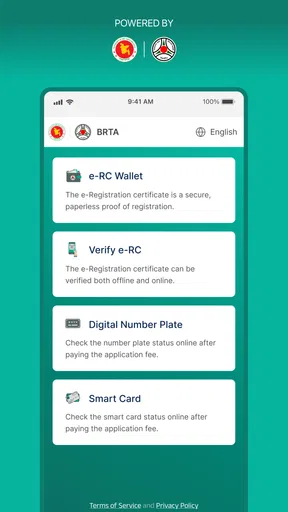
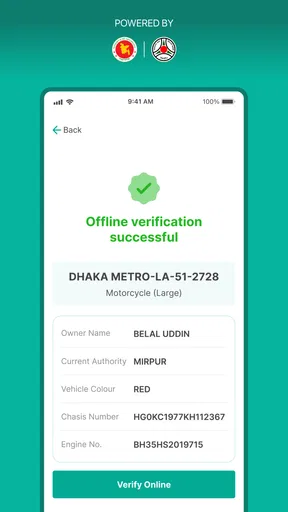
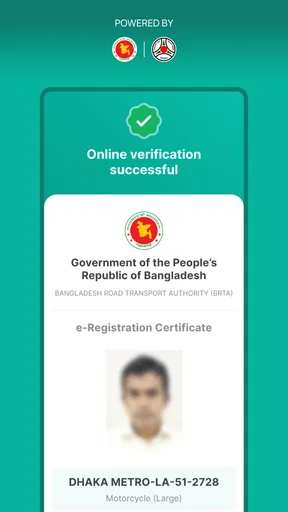
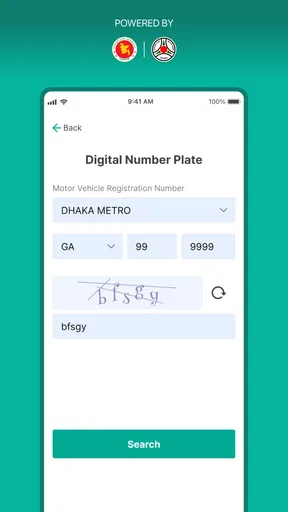
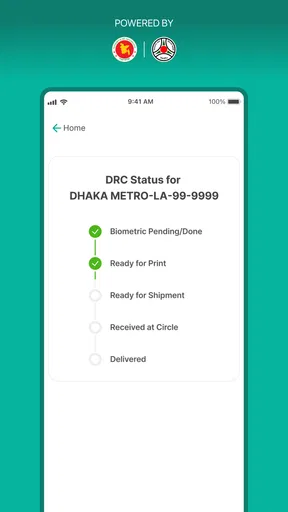
When a vehicle document is involved, I prefer a focused checker over a broad government-services app that makes me search through several menus. BRTA DNP & DRC Checker is built for that narrower job: checking the status of a DNP or DRC, downloading an electronic registration certificate, and confirming whether that document is authentic. I found that focus useful because it keeps the main task visible instead of surrounding it with unrelated transport information.
This is a free Android app in the Auto & Vehicles category, developed by BRTA ICT. It is suitable for Everyone, and its current release is version 1.0.8 for devices running Android 5.1 or later. The app has reached over half a million installs and holds an average rating of 3.9 from around fifteen hundred ratings. Those figures suggest that it has become a practical tool for a sizeable group of vehicle owners, while the rating also tells me to approach it as a useful utility rather than a flawless experience.
How I would decide whether it belongs on my phone
My first decision criterion is the exact document problem I need to solve. If I want to check a DNP or DRC, retrieve an e-RC, or verify an electronic registration certificate, this app is directly relevant. If I am looking for a general driving companion, route planner, fuel tracker, or vehicle-maintenance log, it is the wrong category entirely. Its value comes from doing a small number of official-document tasks without pretending to replace every other transport service.
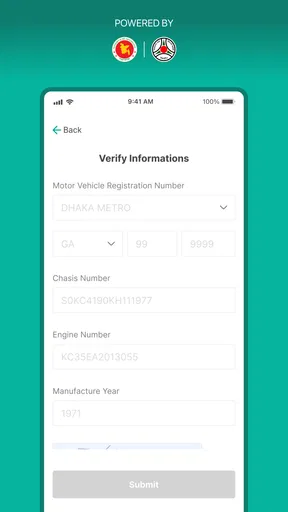
The second criterion is convenience during a moment when accuracy matters. A registration document is not something I want to retype repeatedly into unrelated websites or explain from memory at a counter. A dedicated checker gives me one place to begin the process. I would still read every displayed vehicle detail carefully before treating a result as final, because a convenient screen does not remove the need to check that the document belongs to the correct vehicle and owner.
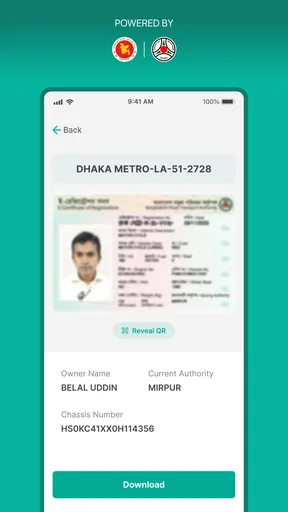
The third criterion is whether I need a digital copy that can be accessed again. The e-RC download function is more useful than a one-time status lookup when I need to keep a document available for later reference. I would save the downloaded file in a clearly named folder and, where appropriate, keep a backup in a secure location. That simple habit matters because the app can help obtain the document, but it should not be the only place where I rely on an important record.
I also consider who is performing the task. A vehicle owner who is comfortable entering document information and reading verification results should find the app approachable. Someone helping a parent, buyer, or family member may appreciate the focused workflow, especially when the alternative is navigating a larger official portal. On the other hand, a person expecting the app to explain every registration problem in plain language may find the experience too limited if a status result needs follow-up outside the checker.
A realistic use case: checking a document before a handover
Imagine that I am preparing to hand over a vehicle or complete a private sale. Before meeting the other person, I would use the checker to review the relevant DNP or DRC status and obtain the e-RC if it is available. I would then compare the displayed information with the physical paperwork and the vehicle itself. This does not turn the app into a complete ownership-transfer service, but it gives me a more organized starting point than relying on a screenshot sent through a messaging app.
Worth Reading Before You Choose

EA SPORTS FC Mobile 26 Is a Bigger Football Game, but It Takes Time

Flipboard Shows What News Apps Must Do Beyond the Feed

Switching to Android Auto Means Rethinking Your Driving Routine

Google Calendar Makes a Crowded Week Easier to Manage

Ludo King Makes the Most of the Minutes Between Plans

Baby Panda World Brings Quick Play to Modern Phones, but Its Game Library Feels Busy
The important detail is to treat verification as a workflow, not as a single tap. I would enter the requested information carefully, inspect the result for mismatched details, download the electronic certificate only after confirming that it relates to the intended vehicle, and keep the result available for the next conversation. This approach reduces a common mistake: forwarding a document before checking whether it is the right one.
For a buyer, that sequence is particularly helpful before making arrangements around a vehicle. The app can support a document check, but I would not interpret a successful authenticity result as a complete inspection of the vehicle, a guarantee about outstanding obligations, or a substitute for the formal steps required for a transaction. Its strength is document-focused confirmation, not broad due diligence.
Where the focused design works best
The clearest advantage is that the app’s purpose is easy to understand. I do not have to decide whether I am looking at a general information page, a service directory, or an unrelated vehicle tool. The DNP and DRC checker sits close to the problem I am trying to solve, while the e-RC and authenticity functions make it more useful than a status-only screen.
I also like the way the three functions can support one another. A status check can tell me where a document stands, a download can give me a usable electronic copy, and authenticity verification can help me judge whether that copy should be trusted. These are different needs, but they often appear in the same real-life situation. Keeping them together is more practical than moving between several unrelated tools.
Another strength is that the app is free. That makes it easy to recommend as a first step for an owner who needs a document check but does not want to commit to a paid service. The Everyone content rating also makes it suitable for households where one person may assist another. I would still advise users to protect personal and vehicle information while using any official-document tool, particularly when sharing screenshots or downloaded files with others.
The developer, BRTA ICT, also gives the app a clear institutional identity. That is relevant when I am deciding between a purpose-built official checker and an unknown third-party application that merely claims to retrieve vehicle information. I would rather begin with the tool associated with the responsible transport authority than hand sensitive registration details to a random utility.
Small habits that make the app more reliable in practice
My first practical tip is to prepare the document details before opening the checker. Instead of switching between papers and the phone while typing, I would place the relevant information where I can read it clearly, then enter it slowly. A single incorrect character can create confusion that looks like a document problem when it may simply be an input mistake.
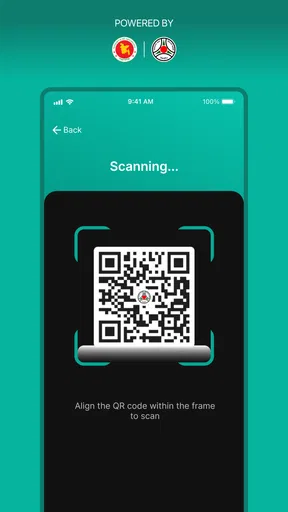
My second tip is to separate checking from sharing. After downloading an e-RC, I would open it and inspect the visible information before sending it to anyone. I would also avoid treating an image preview or forwarded file as proof by itself. The authenticity function is most valuable when used deliberately, rather than when a document is accepted solely because it looks official.
My third tip is to keep a simple record of what I checked and when, without exposing more information than necessary. For example, I might note the vehicle identifier and the purpose of the check in a private note, while storing the actual document securely. This is useful when several vehicles or family members are involved, because it prevents me from confusing one downloaded certificate with another.
A fourth useful habit is to retry thoughtfully when a result does not appear as expected. I would first review the entered details, confirm that I am checking the correct document type, and try again rather than immediately assuming the record is invalid. If the same issue continues, I would use the appropriate BRTA support or service channel instead of repeatedly submitting random variations of the information. The app is a checker, not a diagnostic explanation for every administrative issue.
Where another type of service may fit better
The usual alternatives fall into a few categories. A general government transport portal may be better when I need several services beyond DNP, DRC, e-RC, and authenticity checks. A browser-based service may suit someone who works mainly from a computer or does not want another app installed. A third-party vehicle-information tool may offer a wider collection of convenience features, although I would be more cautious about entering official document details into an unfamiliar service.
That comparison does not make BRTA DNP & DRC Checker inferior; it clarifies its boundaries. If my task is narrowly connected to the supported document types, the focused app is likely faster to understand. If my task includes a broader administrative process, I may have to leave the app and continue elsewhere. Users who expect one application to handle every vehicle-related question should choose a broader platform or use this checker alongside one.
A website can also be the better choice in certain situations. On a shared computer, a browser may be more comfortable for reviewing a document at a larger size. Someone with an older phone that does not meet the Android requirement would need another access route. Likewise, if I am assisting a person remotely, a web page may be easier to guide them through on a call, depending on the service available to them.
I would be careful with unofficial alternatives that promise extra information without making their source clear. More features are not automatically better when the task involves registration records. A smaller official workflow can be preferable to a feature-rich app that leaves me uncertain about where the information came from or how accurately it represents the document.
Limitations I would keep in mind
The rating of 3.9 indicates a mixed but generally usable reception. I read that as a reason to keep expectations realistic. An app can be valuable while still having moments of friction, such as an unclear result, a failed attempt that requires checking the entered details, or a workflow that feels less smooth than a user expects from a modern utility. I would not install it assuming that every document issue will be resolved instantly.
The narrow scope is another limitation. It is excellent when the question is “What is the status of this DNP or DRC?” or “Can I obtain and verify this e-RC?” It is not the right tool for planning a journey, comparing vehicles, recording maintenance, or managing every part of ownership. Installing it for those purposes would only create disappointment because its usefulness is tied to document verification.
There is also a difference between retrieving a digital certificate and understanding an administrative situation. If a document is delayed, a result is unexpected, or information appears inconsistent, the app may show the relevant status without giving me the full explanation I need. In that case, I would use the result as evidence to organize my next question for the responsible office, not as a complete answer to a complicated case.
Finally, a digital copy should be handled with the same care as physical paperwork. Downloading an e-RC is convenient, but leaving it in an unprotected gallery, sending it to a large group, or relying on an old copy can create avoidable problems. The app helps with access and checking; my own storage and sharing habits still determine how safely that document is handled.
The cost of switching between options
Because this app is free, the main cost of trying it is not financial. It is the time spent learning where the relevant function is, entering the document information, and deciding how to store the result. For a one-off lookup, a browser-based route may feel simpler if I already know exactly where to go. For repeated checks, keeping a dedicated tool ready can reduce the mental effort of finding the correct service each time.
Switching to a broader portal may introduce a different kind of cost: more menus, more choices, and a greater chance of starting in the wrong section. That can be worthwhile when I need several transport services, but it is unnecessary for a simple DRC status check. Switching to an unofficial alternative may appear convenient, yet the trade-off is confidence. I would rather spend a little extra time with a clearly identified official tool than save a few taps while wondering whether the result is dependable.
My preferred arrangement would be to keep this app for document-specific tasks and use a broader official channel only when the situation moves beyond its scope. That avoids forcing one tool to do everything. It also means that I can use the checker as a first checkpoint, then carry the relevant result into the next administrative step instead of repeating the entire search from the beginning.
Who should use it and who should skip it
I would recommend it to vehicle owners who occasionally need to check DNP or DRC status, download an e-RC, or verify an electronic registration certificate. It is also a sensible choice for someone helping relatives with vehicle paperwork, especially when a focused mobile workflow is easier than navigating a larger service site. The free price removes a major barrier to trying it, and the Android compatibility covers many everyday devices.
I would be less enthusiastic for someone who needs a complete vehicle-management suite. If the priority is maintenance reminders, trip planning, insurance organization, or buying advice, this app will not replace those tools. I would also suggest another route to anyone whose phone cannot run the app or who prefers handling official documents on a desktop-sized screen.
For buyers and sellers, I see it as one part of a careful process. Use it to check the relevant document and authenticity, compare the returned information with the paperwork, and then complete any required formal steps through the appropriate channel. Do not let a successful check encourage rushed decisions about a vehicle’s overall condition or transaction history.
My recommendation after weighing the trade-offs
My overall view is positive, with a clear condition: BRTA DNP & DRC Checker is most valuable when your task is specifically about DNP, DRC, or e-RC documentation. It brings status checking, electronic certificate access, and authenticity verification into one focused app, and it does so without a purchase price. That is enough to make it a useful addition for many vehicle owners.
I would install it before I needed it, then use it calmly when a document question arises. I would enter details carefully, inspect every result, verify before sharing, and store downloaded certificates securely. Those habits address the practical weaknesses that no checker can solve on its own.
The app is not a universal answer for vehicle administration, and its middling rating means I would allow for occasional friction rather than expecting perfection. Still, compared with searching through unrelated services or trusting an unknown third-party tool, it offers a sensible first stop for official document checks. For that specific purpose, I would recommend giving it a try.
Pros
- Quickly checks BRTA driving licence and vehicle registration details.
- Useful for verifying document information before official transactions.
- Simple interface with straightforward search options.
- Helps identify possible data mismatches in submitted documents.
- Convenient access to BRTA-related checks from a mobile device.
Cons
- Requires an active internet connection for most verification searches.
- Results depend on the accuracy and availability of BRTA records.
- May request sensitive licence or vehicle information from users.
- Not a replacement for official BRTA offices or legal documentation.
- Availability and performance may vary during server maintenance or heavy traffic.
FAQs for BRTA DNP & DRC Checker
What is BRTA DNP & DRC Checker used for?
BRTA DNP & DRC Checker is designed to help users check information related to vehicle registration and digital number plates through Bangladesh Road Transport Authority services. Depending on the available service connection and current BRTA systems, it may provide access to registration details, application status, or digital registration certificate information. It is mainly useful for vehicle owners who want a quicker way to verify official transport-related records.
Is BRTA DNP & DRC Checker an official BRTA application?
Before relying on the app, users should verify its developer name, description, permissions, and download source. Applications using BRTA-related names may provide shortcuts to official online services without necessarily being developed directly by the Bangladesh Road Transport Authority. Do not assume that every app with “BRTA” in its title is an official government product. For sensitive information, compare results with the official BRTA website or authorized service channels.
What information do I need to check a vehicle or registration status?
The exact information required can vary according to the feature being used and the current BRTA service process. You may be asked to enter details such as a vehicle registration number, digital number plate information, registration certificate data, or other identifying information. Enter all details carefully, using the same format shown on your documents. Incorrect numbers, letters, or spacing can produce incomplete, delayed, or inaccurate results.
Does the app require an internet connection, and are the results always available?
Yes, services that retrieve registration or digital certificate information generally require an active internet connection because the app must communicate with an online database or web service. Availability can depend on BRTA server maintenance, network quality, service updates, and regional access. If a result does not appear, try again later and confirm that the submitted information is correct rather than immediately assuming that your vehicle record is missing.
Is it safe to enter personal or vehicle information in BRTA DNP & DRC Checker?
Use caution whenever an application requests personal, registration, or vehicle-related details. Download it only from a trusted source, review its privacy policy and requested permissions, and avoid entering information that is not necessary for the selected service. The app should not require unrelated access to contacts, messages, photos, or other private data. Never share passwords, payment details, or verification codes unless you are certain you are using an authorized BRTA channel.


